Manage your pages
Every page on your site, with its title, status, and SEO at a glance.
What this is
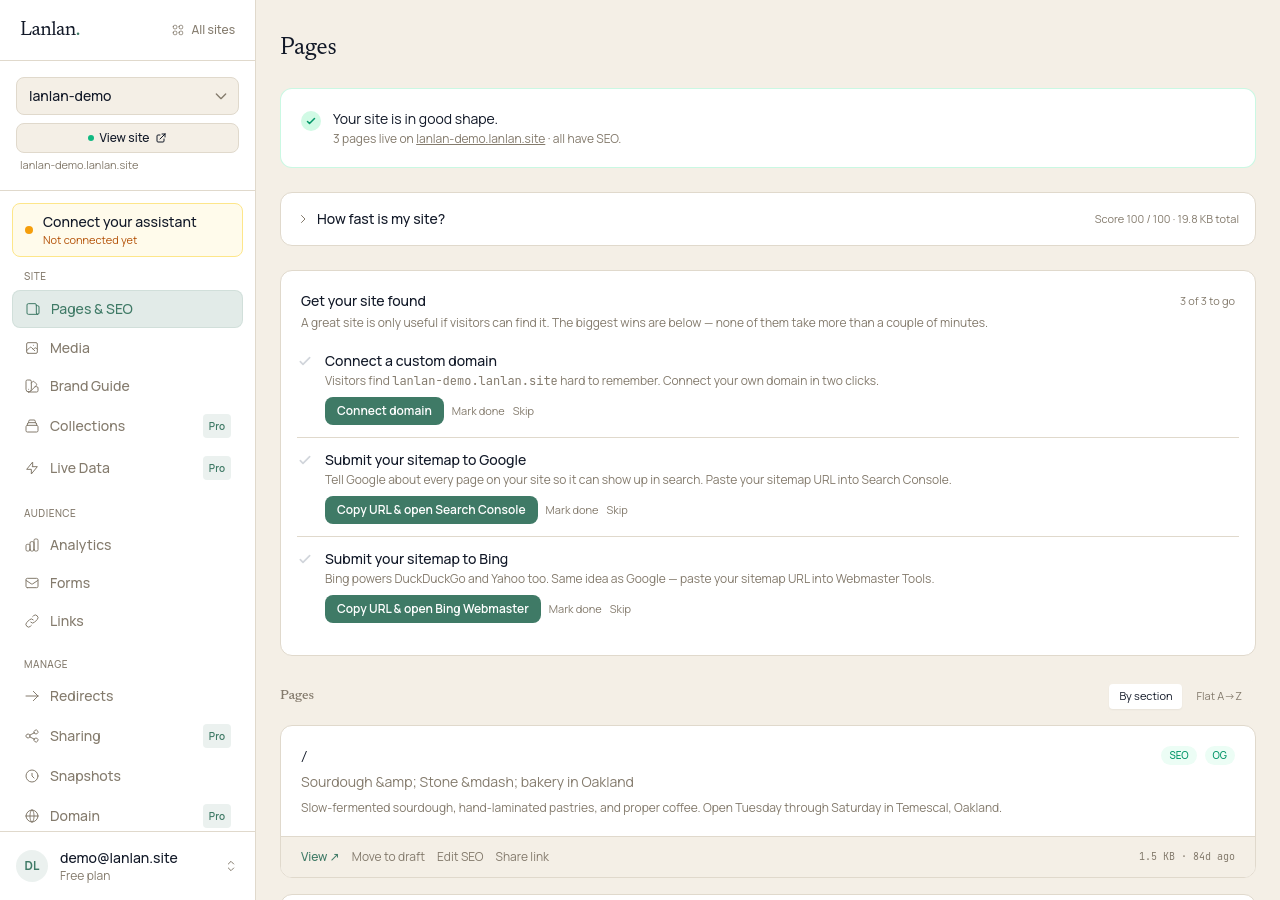
Your dashboard's pages list shows every page on your site — path, title, meta description, draft or live status, password protection, SEO coverage, file size, and when it was last changed.
What you can do from here
- Preview a draft. Generates a link with an expiring token (15 minutes to 7 days). Anyone with the link can view; nobody else can.
- Toggle a page between draft and live. Drafts are excluded from your live site, sitemap, and
robots.txt— nobody finds them on Google or by typing the URL. - Edit the SEO basics. Page title, meta description, and Open Graph tags (the title and image that show up when someone shares the page on social media). Lanlan auto-generates Open Graph fallbacks if you don't set them.
- Set a page password. Visitors have to enter the password to read the page. Useful for previews, gated content, or work-in-progress.
- Get a share link. A normal public link to a live page — handy when you want to copy something quickly to a message.
Drafts vs. live
- A draft is invisible to your visitors. Search engines don't see it (excluded from sitemap and
robots.txt). The only way in is your preview link. - A live page is part of your normal site — indexed, listed, fully public unless you've added a password.
- Toggling between the two is one click. It takes a few seconds for the change to deploy.
Page passwords
Passwords protect a page from casual visitors. Two things to know:
- A password-protected page is excluded from your sitemap and marked
Disallowinrobots.txt, so search engines won't try to index it. - Page passwords currently work on your
your-site.lanlan.sitesubdomain only. If your site is on a custom domain (your-business.com), the page password isn't enforced there yet — a planned feature.
If you need site-wide password protection (one password covers everything), ask Claude: "Put the whole site behind a password." Same caveat about custom domains.
SEO in plain language
The page title is what shows up as the headline in Google's search results and as the tab title in a browser. The meta description is the snippet of text underneath. Open Graph tags are what shows up when someone shares your page on Slack, WhatsApp, or social media.
You can edit all three in your dashboard, or ask Claude: "Update the page title and description for the home page."
What to try next
- See who's visiting — 1 min
- Roll back changes — 2 min
- Add a contact form — 2 min
If you get stuck
Ask Claude. "I can't figure out how to…" almost always gets you unstuck. For anything Claude can't help with, email support.